

Adrasis AI Operator turns everyday operational messages into work that is ready to review. Your team can ask in chat, forward a supplier email, paste a promotion note, send a WhatsApp screenshot, or text from the field. The AI Operator reads what arrived, understands what needs to happen, finds the affected records, and prepares the next step.
The AI Operator is built for the overhead around the decision: reading messy inputs, checking what is affected, setting up repetitive changes, and showing what still needs attention. You stay in control, every change is previewed and only runs after your Confirm.
No special syntax to learn. Bring the work as it arrives, a sentence, promo email, contract PDF, WhatsApp screenshot, or SMS. The AI Operator turns it into a clear task you can review.
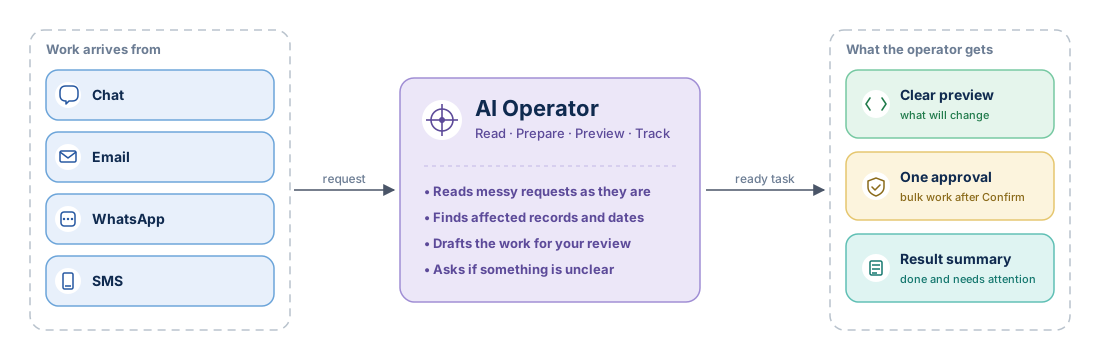
The overhead the AI Operator removes
The AI Operator is useful when the business decision is simple, but getting the work ready takes time.
- It reads what arrived. Emails, contract details, screenshots and short messages become a task.
- It prepares the work. The AI Operator finds the affected properties, dates, rate plans, channels or bookings and drafts the change.
- It keeps the loop clear. If something is unclear, it asks. If the work changes data, it waits for confirmation and then shows the result.
What you can ask the AI Operator to do
The AI Operator's reach spans every operator workflow in the Console. It is strongest when a user knows the desired business outcome but does not want to assemble every screen, filter and batch step manually. Read operations are broad and immediate; write operations always go through preview and confirm.
Catalog and content
Operator-side
Properties, rooms, attributes, meal plans, images, descriptions, query and bulk-update.
- "Find all properties in Antalya without images and queue them for content review."
- "Update Hotel Sunrise's English description with what I'm pasting below."
- "List the properties waiting on a content editor's approval."
Open the catalog reference →
Rates, inventory and promotions
Operator-side
Rate plans, allotments, stop-sale, promotions, day-of-week rules, search the calendar and apply changes in bulk.
- "Apply a 15% weekend discount to Hotel Sunrise rooms for May."
- "Stop-sale Bodrum properties on July weekends."
- "List properties that have a non-refundable rate plan but no BAR defined."
Open the rate plan guide →
Distribution
Operator-side
Outbound channel exposure and inbound reservation tracking.
- "Publish Hotel Sunrise on the channel we onboarded last week."
- "Show me the channels that received zero bookings in the last seven days."
- "Show me when the last rate update went to channel X for Hotel Sunrise."
Open the distribution overview →
Contracts and setup
Operator-side
Supplier setup, allotment matrices, release periods, markup setup.
- (forwarded contract email) "Onboard the supplier in this contract and create the allotment matrix."
- "List the allotments whose release period expires this week."
- "Draft a markup rule for the new supplier for May, ready for my approval."
Open the contracts guide →
Payments
Operator-side
Review settlement, virtual card transactions, refunds, and payment dispute status. On a booking, the AI Operator refunds a payment, captures or releases a hold, and creates, sends or cancels a payment link, each after you approve it. It does not take a new card payment and does not issue or modify virtual cards.
- "Prepare last month's reconciliation report for virtual card transactions."
- "Send the guest of booking BK-12345 a payment link."
- "Show pending refunds for cancelled bookings."
- "Summarise Hotel Sunrise's March settlement by currency."
Open Card payments and payment links →
How an AI Operator operation runs
-
Capture intent
You write a request in chat, paste a promo email, forward a supplier message, send a WhatsApp screenshot, or text an SMS. The channel does not change what the AI Operator does next.
-
AI Operator prepares the operation
The AI Operator reads your input, resolves scope (which properties, which dates, which rate plans), and drafts the operation. If anything is ambiguous, a date range that could mean two things, a property name that matches three records, it asks back with a clarifying question.
-
You see the preview
The AI Operator shows the operation as a preview card that names the change and what it applies to. Choose Details to see where it applies (counts of affected properties, rate plans, dates), every change and what stays the same; you can decide there as well. A card with several changes lists the first three and counts the rest. The preview is bound to your request, once shown, it cannot be tampered with.
-
You confirm; the AI Operator applies
You click Confirm for one change or Approve all for changes prepared together. You can also type confirm when the waiting changes belong to one response, their previews are readable and you can approve them. See Confirm-before-apply. Each change reports its own result.
Read-only requests skip preview and confirm. Listing properties, checking a rate cell, summarising bookings, anything that does not change state, returns immediately.
No auto-execute. The AI Operator never applies a state-changing operation without your Confirm. If you walk away from a preview, the operation expires.
What the AI Operator does not do
- Does not maintain a parallel system. No separate catalog and no second source of truth. A change made through the AI Operator appears in the same product views as a Console change.
- Acts when you ask. AI Agents work on the tasks you define and provide results and recommendations for your review.
- Does not read another organization's data. Organization isolation extends to the AI Operator. Another agency's contracts stay outside your workspace, and a conversation is listed, opened, pinned or deleted only in the organization it was started in.
Usage and token packs
Every organization gets daily and monthly AI Operator usage included in its subscription at no additional charge. Usage is counted in usage units that follow real consumption, so a lower-cost model stretches the same allowance further.
| What you see | Where |
|---|---|
| Used, in progress and remaining for today and this month | AI Operator, Model, Usage and packs tab |
| Reset times, in your local time | Same tab |
| Each model's list price per one million tokens | AI Operator, Model |
When an allowance runs out, an administrator can buy a token pack on the Usage and packs tab. The pack is ready at once, stays valid until the end of the calendar month (UTC), and its price is added to the monthly accrual statement. Read Choosing the model for the details.
AI Agents have a separate monthly fee and use token packs from their first run. Their usage does not draw on the included AI Operator allowance.
When your organization has Adrasis Usage Credits, usage beyond the allowance and AI Agents are paid from that credit without a token pack.
Conversations in your online shop's AI Mode count toward the same AI Operator usage.
Where to next
- The channels the AI Operator runs on → Channels
- Why every write waits for your approval → Confirm-before-apply
- The operations the AI Operator can do for you → Tools